
Go Backs
HomeCategoriesStatesCheck Your Home
Go Backs

Track product recalls and safety alerts from CPSC, FDA, NHTSA, and USDA. Stay informed and keep your family safe.

Browse

  • Categories
  • States
  • Check Your Home
  • Risk Levels

Agencies

  • CPSC
  • FDA Food
  • FDA Drug
  • FDA Device
  • FDA Veterinary
  • NHTSA
  • USDA

Company

  • About
  • FAQ
  • Contact
  • Terms of Service
  • Privacy Policy
Buy Me a Coffee

Recall data is sourced from official U.S. government agencies (CPSC, FDA, NHTSA, USDA) and processed using AI to improve readability. This site is not affiliated with or endorsed by any government agency. Always refer to the original agency notice for authoritative information.

ยฉ 2026 Go Backs. All rights reserved.

Medium RiskCPSC
Electronics & Technology/Smart Home

Nest Labs Recalls to Repair Nest Protect Smoke + CO Alarms Due to Failure to Sound Alert

Agency Publication Date: May 21, 2014
Share:
Sign in to monitor this recall

Summary

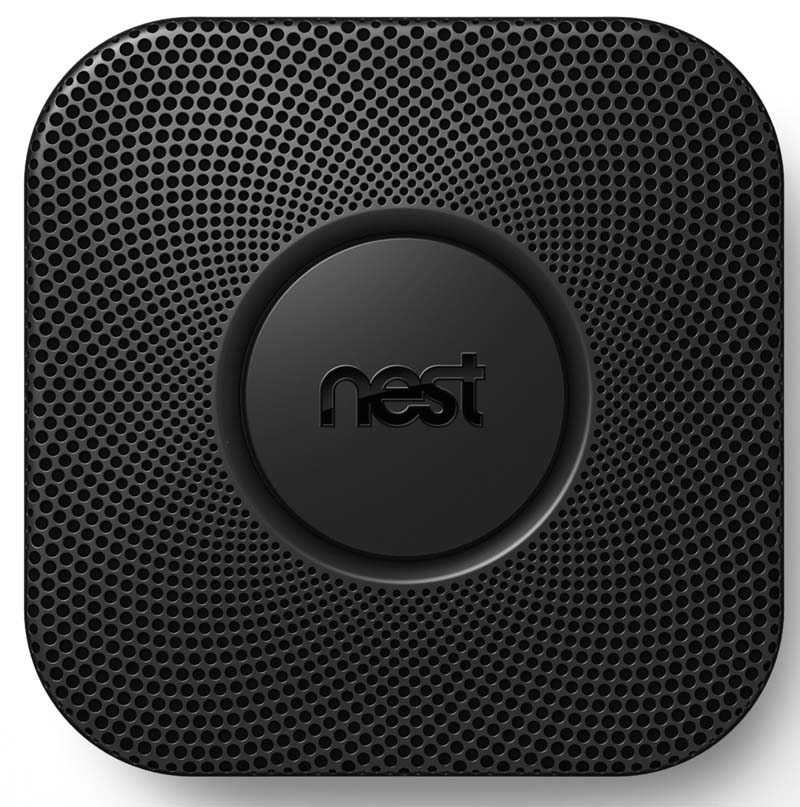
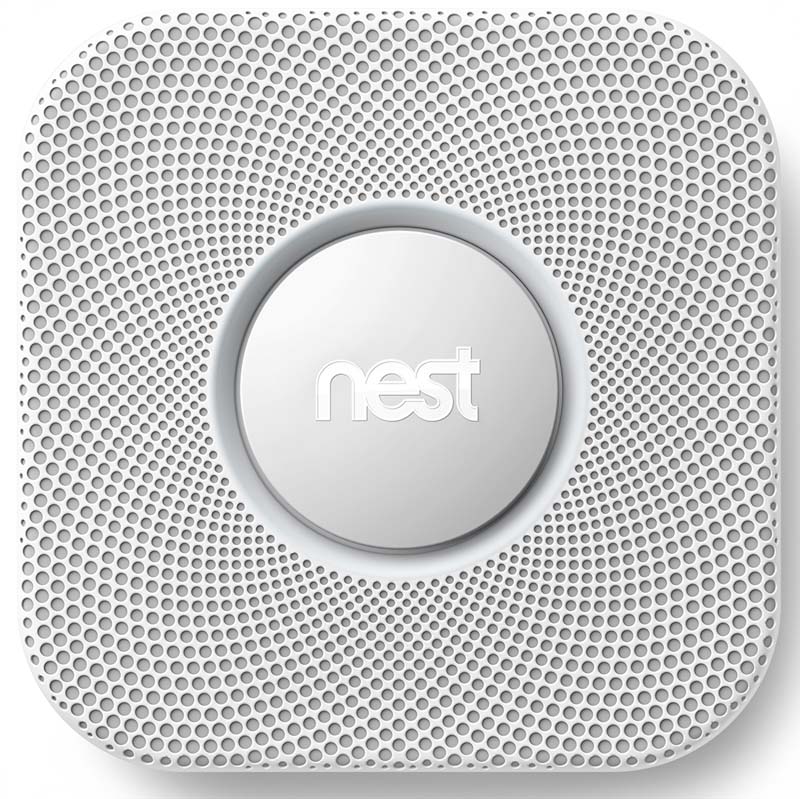
Nest Labs is recalling about 440,000 Nest Protect Smoke + CO alarms because a software feature called 'Nest Wave' can prevent the alarm from sounding immediately during a fire. The affected alarms are 5.25-inch square plastic units (about 1.5 inches deep) in black or white with the word 'nest' on a large center button. These units were sold at Best Buy, Home Depot, and online at nest.com and amazon.com between November 15, 2013, and April 3, 2014. Nest is providing an automatic electronic software update that disables the faulty feature for all connected devices.

Risk

If there is activity near the device during a fire, the Nest Wave feature may mistake that movement for a command to silence the alarm, causing it to fail to alert residents of a fire. No injuries or incidents have been reported to date.

What You Should Do

  1. Identify your device: Check if you have a square Nest Protect Smoke + CO alarm (5.25 inches square) in black or white plastic with a large 'nest' button on the face.
  2. Check your connection status: If your Nest Protect is already connected to your wireless network and linked to your Nest account, the repair update should have been delivered automatically.
  3. Verify the update: Log into your Nest account via the mobile or web application, go to 'Nest Sense' settings, and confirm that the 'Nest Wave' button is set to 'off' and is grayed out.
  4. Connect offline devices immediately: If your device has never been connected to the internet, you must immediately connect it to your wireless network and link it to a Nest account to receive the mandatory software update that disables the Nest Wave feature.
  5. Follow official setup instructions: For help connecting your device or verifying the update, visit http://support.nest.com/article/Nest-Protect-Safety or contact Nest Labs.
  6. Contact Nest Labs: Call (800) 249-4280 anytime or visit www.nest.com and click on the 'Nest Protect Safety Notice' for more information.
  7. For additional safety questions, contact the CPSC Hotline at 800-638-2772.

Your Remedy Options

๐Ÿ“‹Refund, Repair

The repair is an automatic electronic update that disables the Nest Wave feature and is delivered automatically to devices connected wirelessly to the Internet and linked to a Nest account. Consumers should take one of the following actions: Consumers who have not connected their Nest Protect devices to their wireless network and linked them to a Nest account should immediately do so. The devices will automatically receive the update that disables the Nest Wave feature. Customers should confirm that their devices have been updated by going to Nest Sense on their Nest account mobile or web application and ensuring that the button for Nest Wave is off and grayed out. Instructions on how to connect to a network and disable the feature are available at http://support.nest.com/article/Nest-Protect-Safety or by contacting Nest Labs. Consumers whose Nest Protect devices are connected to their wireless network and linked to a Nest account should immediately confirm the receipt of an automatic repair that disabled the Nest Wave feature by going to Nest Sense on their Nest account mobile or web application and ensuring that the button for Nest Wave is set to "off" and grayed out. No further action is required and consumers can continue to use their devices.
Contact: Nest Labs at (800) 249-4280 anytime or online at www.nest.com and click on Nest Protect Safety Notice for more information.

Affected Products

Product: Nest Protect Smoke + CO Alarm (Black)
Date Ranges: Sold between November 15, 2013 and April 3, 2014
Product: Nest Protect Smoke + CO Alarm (White)
Date Ranges: Sold between November 15, 2013 and April 3, 2014

Product Images

Nest Protect Smoke + CO Alarm - Black
Nest Protect Smoke + CO Alarm - Black

Nest Protect Smoke + CO Alarm  - White

Nest Protect Smoke + CO Alarm - White

Additional Information

Agency: Consumer Product Safety Commission (CPSC)
Recall ID: 14187
Status: Active
Sold By: Best Buy, Home Depot and other retailers nationwide, and online at nest.com, amazon.com, bestbuy.com and homedepot.com from November 15, 2013 to April 3, 2014 for about $130.
Distributor: Nest Labs Inc. of Palo Alto, Calif.
Manufactured In: China
Units Affected: About 440,000
Distributed To: Nationwide
Importer: Nest Labs Inc. of Palo Alto, Calif.
Contact: Nest Labs at (800) 249-4280 anytime or online at www.nest.com and click on Nest Protect Safety Notice for more information.
Agency Last Updated: January 9, 2015

Were You Affected by This Recall?

If you or a family member were harmed by this recalled product, you may have legal rights. Consider consulting a consumer protection attorney to understand your options for compensation.

Find an Attorney

This is general information, not legal advice. Go Backs is not a law firm and does not provide legal services.

AI-Enhanced Content: The summary, action steps, and risk assessment on this page were generated by AI from official government recall data to improve readability. This is not legal or medical advice. Always refer to the official agency sources below for authoritative information.

Sources: CPSC Notice ยท Raw API Response